Gronda - For Chefs
- 4.7
- Rating
- 1.00M
- Installs
- Free
- Price

 Analysis by App-foxy
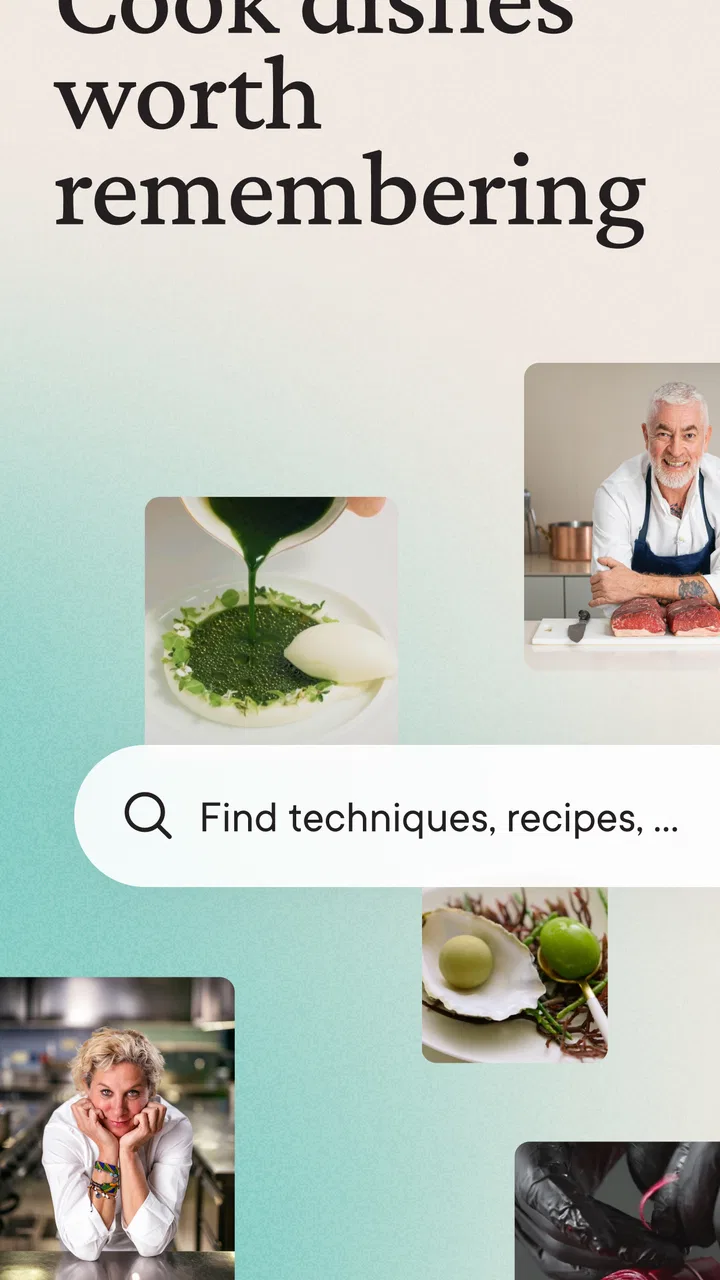
I approached Gronda - For Chefs as a working food app rather than another recipe feed. Its strongest idea is the way it puts chefs, baristas, barkeepers, waiters and food lovers in the same visual space, so the useful part is not only finding something to cook. It is seeing how professionals present an idea, then deciding whether that idea belongs in my own kitchen, café, bar or dining routine.
That focus makes it different from a standard cooking app. A conventional recipe service usually starts with ingredients, preparation steps and timings. Gronda feels more like a source of culinary inspiration built around people and finished dishes. I can browse, pause on a technique or presentation detail, and save an idea mentally before deciding how to adapt it. The real value is turning visual inspiration into a practical starting point, not replacing a chef’s judgement or a carefully tested recipe book.
It is a free Food & Drink app from Gronda GmbH, rated 4.7 on average from around 24 thousand ratings, with more than a million installs. Those figures suggest that it has reached well beyond a small professional circle, and my experience explains why: the interface is approachable enough for a curious home cook, while the subject matter still feels relevant to people who work around food every day.
You May Also Like

 Blood Strike: 2.5 Anniversary
Blood Strike’s Loadouts Turn Every Drop Into a Tactical Gamble
A close look at Blood Strike’s custom loadouts: how fast access to signature weapons reshapes its battle royale rhythm, rewards preparation, and narrows the gap between fights.

 Pandora - Music & Podcasts
Pandora’s Music Is Easy to Start, but Harder to Recover
Pandora’s strength is its low-effort path from a seed to a station. Its weak spot is how much confidence it asks you to place in connection, setup, and quiet recovery.

 8 Ball Pool
 Is Built on Rivalries, Rematches, and Routine
A close look at the rivalries, rematches, shared routines, and unanswered safety questions that turn a quick pool match into a persistent mobile community.

 Samsung Music
’s Quiet Strength Is Playing What You Already Own
Its reach comes less from spectacle than from dependable access to a personal library. That simplicity is both the app’s strongest retention engine and its ceiling.

 AccuWeather: Weather Radar
AccuWeather Review: A Quick, Clear Forecast for Everyday Decisions
For everyday plans, the best forecast is the one you can understand quickly. AccuWeather makes rain timing, radar, and local conditions easy to act on, with a few trade-offs.

 Hill Climb Racing
Why Hill Climb Racing Still Turns Crashes Into One More Run
A tiny car, a bumpy hill and one more upgrade: Hill Climb Racing keeps resurfacing because its simple chaos makes every near-miss feel personal.
More From Our News Desk



Why the visual culinary feed matters
The central capability is discovery. Instead of forcing me to know exactly what I want before opening the app, Gronda lets me encounter dishes, drinks and professional ideas first. That changes the way I plan. I might begin looking for a dinner idea and end up thinking about plating, a garnish, a coffee presentation or a service detail that would never appear in a basic search for “quick pasta.”
This is especially useful when I am stuck between familiar choices. Recipe websites are efficient when I already have a dish in mind, but they can make cooking feel like a form to fill in: choose a recipe, collect ingredients and follow instructions. Here, the visual presentation creates a different kind of prompt. I can ask myself what makes an image appealing, which part is achievable at home and which part belongs to a professional kitchen.
That distinction is important. I would not treat every post as a complete, tested recipe with all the information needed for immediate cooking. The app works better as a professional reference and idea board. When I need exact quantities, reliable substitutions or a tightly timed meal, a dedicated recipe source may still be the safer tool. When I want to expand my sense of what food can look like or how a drink can be presented, this app is much more engaging.
The audience description is unusually broad, but it makes sense in use. A chef can look for presentation and technique inspiration. A barista may find ideas for how a drink is finished or served. A barkeeper can use the feed to explore visual direction for cocktails and service. A waiter can gain a better understanding of the food and drink being presented to guests. A home cook may simply discover a new combination worth trying. The same content can have different value depending on the viewer’s experience.
Using inspiration without copying blindly
My most useful habit was to separate the “idea” from the “production.” A polished dish can contain several lessons at once: color contrast, height, texture, portion size or the order in which components are placed. I found it more productive to choose one of those lessons and apply it to a familiar dish than to attempt an exact recreation with unsuitable equipment and ingredients.
For example, a home cook preparing a simple dinner could use the app before shopping, not while standing over a hot pan. I would browse for a presentation direction, save the visual memory of what caught my attention, then build a realistic shopping list around ingredients I can actually buy. This avoids a common trap with food inspiration: collecting attractive ideas that are too complicated to execute on a normal evening.
Professionals can use the same process at a different level. A chef might compare several plating approaches before discussing a new special with the team. A café owner could examine how other people make a familiar beverage feel distinctive without changing its basic identity. A waiter could use the app as a way to become more comfortable discussing food visually with guests. The app does not make those decisions, but it gives the decision-maker more references.
One practical tip is to browse with a question rather than endlessly scrolling. I get more from the app when I decide whether I am looking for a dish idea, a presentation cue, a beverage detail or general creative direction. Without that filter, the attractive images can become distracting. With it, the feed becomes a visual research tool.
What everyday use feels like
Imagine that I have guests coming over after work. I do not need a restaurant-level menu, but I want the meal to feel considered. I can open Gronda during a short break, look at how professionals balance colors and textures, and choose one manageable detail: a cleaner way to arrange the plate, a contrasting finishing element or a more thoughtful drink presentation. I then return to my own recipes and use the app as a reference rather than trying to reproduce an entire professional service.
That is where the app feels most realistic. It can improve the ambition of an ordinary meal without pretending that a home kitchen has the staff, equipment or preparation time of a restaurant. The best result may be a small change in how I finish or serve something, not a dramatic new recipe. This makes the experience useful even when I only have a limited pantry and a short evening.
For people working in hospitality, the scenario changes. A team member may open the app between tasks to refresh their eye for current presentation styles or to find a visual prompt for a conversation with colleagues. The short, image-led nature suits quick breaks better than reading a long cookbook chapter. However, I would still use a proper training document for standards, allergens, exact preparation and service procedures. Inspiration is not a substitute for operational information.
The app is also helpful for learners who want to develop taste and judgement. Beginners often ask for a list of rules, but food presentation is partly learned by comparing examples. Looking at many different approaches can help me notice why one plate feels balanced and another feels crowded. That kind of visual literacy is difficult to gain from ingredient lists alone.
Where it fits beside recipe apps and social feeds
Compared with a conventional recipe app, Gronda is less focused on a linear cooking lesson. If I want a precise sequence from preparation to serving, a structured recipe platform is usually more convenient. Those apps tend to be better for scaling portions, checking timings and cooking directly from a phone. Gronda is stronger earlier in the process, when I am deciding what direction to take.
Compared with a general social network, it feels more relevant because the subject is concentrated around food and hospitality. A broad social feed can offer recipes and restaurant content, but it also mixes in unrelated posts and encourages fast, shallow scrolling. Gronda’s narrower purpose makes it easier to remain in a culinary mindset. I am less likely to lose the thread of what I opened the app to find.
Compared with a digital cookbook, it is more open-ended and visual, but less dependable as a complete reference for a specific dish. A cookbook gives me a tested structure; Gronda gives me a wider field of examples. I see them as complementary rather than interchangeable. I would use a cookbook or recipe source for execution and this app for discovery, comparison and creative direction.
Tradeoffs that become clear after regular use
The same visual strength that makes the app inviting can also make it demanding. Beautiful food encourages ambition, and ambition can turn into unrealistic expectations. A professional-looking plate may depend on specialist tools, long preparation or ingredients that are not practical for a casual cook. I had to learn to judge the transferable idea instead of treating every image as an instruction.
Another limitation is that inspiration can be less searchable than a traditional recipe database. When I know the exact ingredient or dietary requirement I need, a purpose-built search tool may take me to a usable answer faster. Gronda makes more sense when I am open to discovery. If I want “a simple meal using three ingredients,” I would not make this my only resource.
The app is free to install, but it includes in-app purchases ranging from $6.99 to $149.99 per item. That makes it sensible to explore the free experience first and decide whether any paid part genuinely supports my use. I would be cautious about paying simply because the visual content is attractive. A professional who uses the app for ongoing inspiration may see more value than someone who opens it once every few months.
Its Teen content rating also matters for households and younger users. It is not a children’s cooking curriculum, so parents looking for very simple, supervised recipes should choose a tool designed around that need. The rating does not change the app’s culinary focus, but it is worth checking before treating it as a family learning app.
Device compatibility is reasonably broad: the current version is 8.8.2 and it requires Android 7.0 or later. That should cover many older Android phones, although people using very old devices should check compatibility before planning around it. I also prefer browsing on a comfortable screen when I am studying presentation details; a small phone display is fine for quick discovery, but less pleasant for comparing several visual ideas closely.
Three ways to get more from it
First, I would use it as a “one-change” exercise. Choose one image or concept, then ask what single adjustment can improve a dish I already know. It might be the plate shape, the contrast between components or the way a drink is finished. This keeps the app practical and prevents an evening meal from becoming an overambitious project.
Second, I would browse before menu planning rather than after buying ingredients. A short session can reveal a direction, and then I can choose affordable, available ingredients that fit it. This is more efficient than opening the app after shopping and discovering ideas that require a completely different pantry.
Third, professionals can use it as a discussion starter. Instead of sending a vague message saying that a new dish should look “more modern,” a team can point to a visual reference and discuss the specific element they want to explore. The important step is translating the reference into the team’s own standards, budget and service speed. The app helps with the conversation, not the final specification.
A fourth useful approach is to treat the feed as a learning archive in my head. I try to remember why a dish caught my attention, not merely that it looked attractive. Was it the restraint of the garnish, the relationship between warm and cool colors, or the clear separation of textures? That question turns passive scrolling into a small exercise in observation.
Who should install it, and who should skip it
I would recommend Gronda to cooks who have outgrown basic recipe browsing and want a stronger visual sense of food. It is also a natural fit for culinary students, hospitality workers and professionals who need fresh references without opening a full cookbook. Baristas and barkeepers may appreciate that the app’s audience extends beyond plated food, while waiters can use it to stay connected to the visual side of the products they serve.
It is less suitable for someone who wants a strict meal planner, nutritional tracking, a shopping-list system or step-by-step guidance for every recipe. I would also skip it as a primary tool if my main concern is allergy-safe cooking or exact dietary control. Those situations call for information that is structured and explicit. A visual discovery app can inspire a dish, but it should not be the only basis for a safety-sensitive decision.
People who dislike social-style browsing may find the experience too open-ended. The app rewards curiosity, but it does not always provide the same sense of completion as checking off a recipe. That is not a flaw for its intended purpose, yet it is a genuine mismatch for users who want a clear beginning, middle and end every time they open a food app.
For me, the deciding question is simple: do I need an answer, or do I need a better idea? If I need an answer, I will reach for a structured recipe or reference source. If I need to see possibilities and develop my own judgement, Gronda is more compelling. It earns its place as a culinary inspiration tool, not as a replacement for every other food app.
My final take after weighing the experience
Gronda - For Chefs succeeds because it understands that food is visual before it becomes procedural. The app gives me a concentrated way to observe professional dishes, drinks and hospitality ideas, then adapt the useful parts to my own situation. Its broad audience is not just a slogan in practice: the same visual material can help a home cook plate dinner, a barista rethink presentation or a chef start a menu conversation.
The tradeoff is that I must bring judgement. I should not assume that an attractive post is a complete recipe, an affordable plan or a realistic weeknight project. The app is at its best when I use it early, before cooking begins, and extract one achievable lesson from what I see. Used that way, it adds creativity without forcing me to imitate a professional kitchen.
With a free entry point, a 4.7 average and a large community of users, it is easy to justify trying, especially for anyone who works with food or enjoys learning through images. The paid items mean I would still review my usage before spending more, and I would choose another app when I need precise instructions or strict planning. But for visual discovery and culinary perspective, I found it genuinely useful. The developer, Gronda GmbH, has built something that feels most valuable when it changes how I look at an ordinary dish and gives me a practical reason to make it better.
FAQs for Gronda - For Chefs
01What is Gronda and who is it for?
Gronda is a networking and learning platform specifically designed for chefs and culinary professionals. It offers a space to connect with other chefs, share culinary experiences, and discover new recipes and techniques. Whether you’re an aspiring chef or a seasoned professional, Gronda provides valuable resources and a community to enhance your culinary journey.
02How does Gronda benefit chefs in their careers?
Gronda benefits chefs by providing access to a global network of culinary professionals, offering opportunities to learn from top chefs, and showcasing new trends and techniques. It also facilitates collaborations, job opportunities, and business growth by allowing chefs to showcase their skills and connect with potential employers or partners.
03What features does Gronda offer to its users?
Gronda offers a variety of features including a rich library of recipes, video tutorials, and articles from industry experts. Users can connect with other chefs, participate in discussions, and attend virtual events. The app also allows chefs to build a professional profile, display their culinary achievements, and apply for job opportunities.
04Is Gronda available on both Android and iOS?
Yes, Gronda is available for download on both Android and iOS platforms. Users can access the app on their smartphones or tablets, allowing them to stay connected and learn on-the-go. The app is designed to provide a seamless experience across different devices, ensuring accessibility for chefs worldwide.
05Are there any costs associated with using Gronda?
Gronda offers both free and premium features. While users can access a basic set of features for free, subscribing to the premium version unlocks additional content such as exclusive tutorials, advanced networking tools, and personalized job recommendations. The premium subscription is designed to provide an enhanced experience for serious culinary professionals.
Pros
- User-friendly interface for easy navigation.
- Extensive recipe database with diverse cuisines.
- Connect with a global community of chefs.
- Access to exclusive culinary tutorials.
- Regularly updated with new features.
Cons
- Requires internet connection for full functionality.
- Limited offline access to recipes.
- Some features behind a paywall.
- Notifications can be overwhelming at times.
- Occasional bugs in the app updates.

Gronda - For Chefs
Gallery